
 消费税的税收筹划免费版【税收筹划ppt】
 Head First HTML与CSS(中文版)pdf高清扫描版
 现代操作系统(中文第三版)pdf完整扫描版
 JavaScript基础教程pdf格式高清免费完整版【
 05G613混凝土小型空心砌块墙体结构构造图集

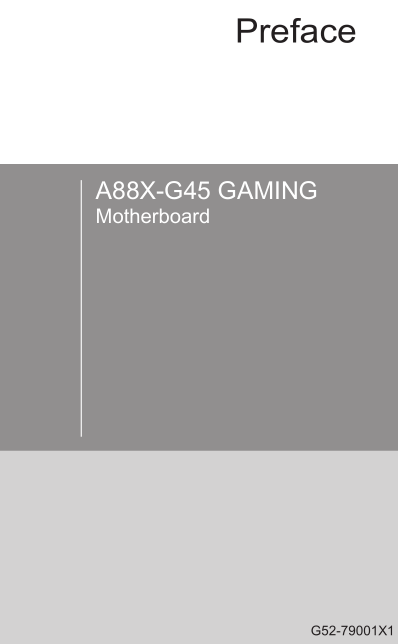
今天小编和大家分享的是微星A88X-G45 GAMING主板用户手册,为英文版。微星A88X-G45 GAMING主板采用AMD Socket FM2+/FM2 架构 A-Series/Athlon™ 处理器,支持 XMP/AMP DDR3 内存模块。有需要的朋友可立即下载此文档。
温馨提示:
本文档为PDF格式文档,因此需确保在阅读之前你已经安装了pdf阅读器,如果尚未安装阅读器,建议下载福昕pdf阅读器或其他PDF阅读器,进行安装后阅读。
微星A88X-G45 GAMING用户手册目录
Preface ............................................................................................................i
Copyright Notice ......................................................................................................ii
Trademarks ..............................................................................................................ii
Revision History ......................................................................................................ii
Smartphone Application ..........................................................................................iii
Technical Support ..................................................................................................iii
Safety Instructions ..................................................................................................iv
FCC-B Radio Frequency Interference Statement ................................................... v
CE Conformity ......................................................................................................... v
Radiation Exposure Statement ...............................................................................vi
European Community Compliance Statement ........................................................vi
Taiwan Wireless Statements ...................................................................................vi
Japan VCCI Class B Statement ..............................................................................vi
Korea Warning Statements .....................................................................................vi
Battery Information .................................................................................................vii
Chemical Substances Information .........................................................................vii
WEEE (Waste Electrical and Electronic Equipment) Statement ...........................viii
Chapter 1 Getting Started............................................................................1-1
Packing Contents .................................................................................................1-2
Optional Accessories ...........................................................................................1-2
Assembly Precautions ..........................................................................................1-3
Motherboard Specifications ..................................................................................1-4
Connectors Quick Guide ......................................................................................1-7
Back Panel Quick Guide ......................................................................................1-9
APU (Accelerated Processing Units) .................................................................1-11
Introduction to FM2/ FM2+ APU ..................................................................1-11
APU & Cooler Installation ............................................................................1-12
Memory ..............................................................................................................1-14
Dual-Channel mode Population Rule ..........................................................1-14
Mounting Screw Holes .......................................................................................1-15
Power Supply .....................................................................................................1-16
JPWR1~2: ATX Power Connectors .............................................................1-16
Expansion Slots .................................................................................................1-17
PCI_E1~6: PCIe Expansion Slots ................................................................1-17
PCI1: PCI Slot ..............................................................................................1-17
Video/ Graphics Cards ......................................................................................1-18
Single Video Card Installation ......................................................................1-18
AMD CrossFire™ (Multi-GPU) Technology .................................................1-19
Internal Connectors ............................................................................................1-21
SATA1~8: SATA Connectors .....................................................................1-21
CPUFAN,SYSFAN1~3: Fan Power Connectors ..........................................1-22
JFP1, JFP2: System Panel Connectors ......................................................1-23
JUSB1~3: USB 2.0 Expansion Connectors ...............................................1-24
JUSB4: USB 3.0 Expansion Connector .......................................................1-24
JCI1: Chassis Intrusion Connector ..............................................................1-25
JTPM1: TPM Module Connector ................................................................1-25
JCOM1: Serial Port Connector ....................................................................1-26
JAUD1: Front Panel Audio Connector .........................................................1-26
Jumper ...............................................................................................................1-27
JBAT1: Clear CMOS Jumper .......................................................................1-27
Voltage Checkpoints ..........................................................................................1-28
V-Check Spots .............................................................................................1-28
Buttons & Switches ............................................................................................1-29
OC1: OC Genie Button ...............................................................................1-29
POWER1: Power Button ..............................................................................1-30
RESET1: Reset Button ................................................................................1-30
OC_SWITCH1: OC Genie Mode Switch ......................................................1-31
SLOW_MODE: Slow Mode Booting Switch .................................................1-31
LED Status Indicators ........................................................................................1-32
OC Genie Mode LEDs .................................................................................1-32
Debug Code LED Table ...............................................................................1-33
Drivers and Utilities ............................................................................................1-34
Total Installer ...............................................................................................1-34
Chapter 2 Quick Installation ........................................................................2-1
APU Installation ....................................................................................................2-2
Memory Installation ..............................................................................................2-4
Motherboard Installation .......................................................................................2-5
Power Connectors Installation .............................................................................2-7
SATA HDD Installation .........................................................................................2-9
mSATA SSD Installation ....................................................................................2-10
Front Panel Connector Installation .....................................................................2-11
JFP1 Connector Installation .........................................................................2-11
Front Panel Audio Connector Installation ....................................................2-11
Peripheral Connector Installation .......................................................................2-12
USB2.0 Connector Installation .....................................................................2-12
USB3.0 Connector Installation .....................................................................2-12
Graphics Card Installation ..................................................................................2-13
Chapter 3 BIOS Setup .................................................................................3-1
Entering Setup .....................................................................................................3-2
Entering BIOS Setup .....................................................................................3-2
Overview ..............................................................................................................3-3
Operation .............................................................................................................3-5
SETTINGS ...........................................................................................................3-6
System Status ................................................................................................3-6
Advanced .......................................................................................................3-7
Boot .............................................................................................................3-12
Security ........................................................................................................3-12
Save & Exit ..................................................................................................3-13
OC ......................................................................................................................3-14
M-FLASH ...........................................................................................................3-19
OC PROFILE .....................................................................................................3-20
HARDWARE MONITOR ....................................................................................3-21
Appendix A Realtek Audio .......................................................................... A-1
Software Configuration .........................................................................................A-2
Software panel overview ................................................................................A-2
Auto popup dialog ..........................................................................................A-3
Hardware Default Setting .....................................................................................A-4
Appendix B AMD RAID............................................................................... B-1
Introduction ..........................................................................................................B-2
Using AMD RAID Controller BIOS Configuration Utility .......................................B-3
Understanding the Colour Code ....................................................................B-3
Initialize Disks ......................................................................................................B-4
Create Arrays .......................................................................................................B-5
Delete Arrays .......................................................................................................B-6
Swap Arrays .........................................................................................................B-7
Manage Spares ....................................................................................................B-8
Change the Controller Options .............................................................................B-9
Booting the system from an array ..................................................................B-9
Pausing the boot sequence for warning messages .......................................B-9
Change the Staggered Spinup Count ..........................................................B-10
Installing Driver ..................................................................................................B-11
Installing OS on 2.2TB RAID ..............................................................................B-12
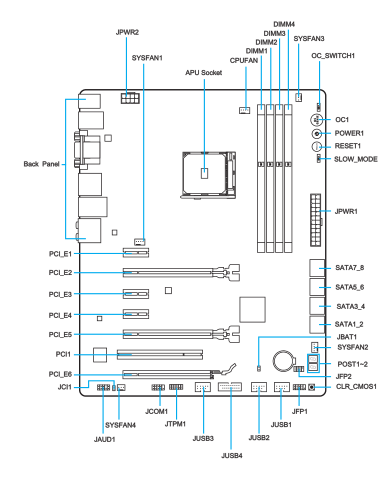
微星A88X-G45 GAMING用户手册——主板结构图
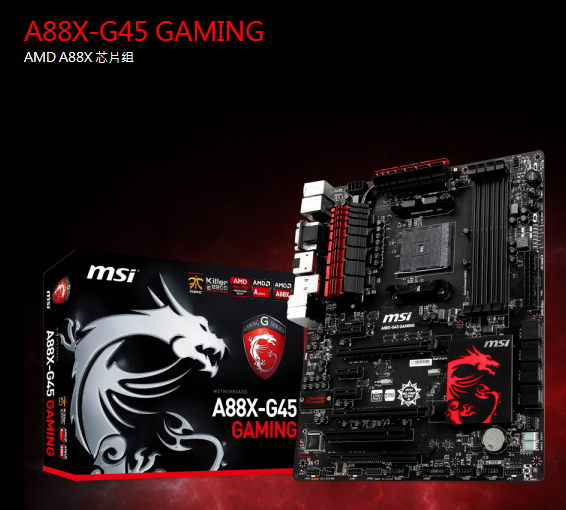
微星A88X-G45 GAMING规格参数
CPU 插槽 FM2+
CPU (最高支持) AMD Socket FM2+/ FM2 A-Series/Athlon™ Processors
芯片组 AMD A88X
DDR3 内存 DDR3 2400(OC)/2133/1866/1600/1333 MHz
内存通道 Dual
内存插槽 4
最大内存 (GB) 64
PCI-Ex16 3
PCI-E Gen Gen3 (16)
PCI-Ex1 3
PCI 1
SATAIII 8
USB 3.0 接口 (前端) 2
USB 2.0 接口 (前端) 6
RAID 0/1/5/10
网络接口 10/100/1000*1
TPM 1
USB 3.0 接口 (背板) 6
USB 2.0 接口 (背板) 2
音源接口 (背板) 6
Display Port 1
VGA 1
HDMI 1
DVI 1
共享最大显存 (MB) 1760
DirectX DX11
尺寸 ATX
CrossFire Y


 Spring MVC学习指南pdf高清扫描版
 疯狂android讲义第3版pdf高清扫描版【中文版
 php从入门到精通第3版pdf高清完整扫描版免费
 GB50016-2014建筑设计防火规范pdf格式免费版
 别怕 Excel 函数其实很简单pdf高清完整版